Unit 4.3 Create study metadata activity
Unit overview
Unit study time
- 45 minutes
Intended Learning Outcomes
By the end of the unit, you will ...
- Be familiar with how to create metadata about a research project and identify what metadata elements to capture
- Know how to implement best practice (metadata standards and controlled vocabularies) in metadata creation
Creating metadata
How to approach metadata creation
How do you decide what metadata to create?
What metadata you choose to create depends on the aims of your research and what you want to do with it. If your data is only for personal use, your metadata might only need to capture key details that will be useful for your current and future work. However, if you’re planning to share your research more widely and/or deposit it in a data repository or catalogue, you’ll likely need to create more metadata to help others understand and use your data. A data repository or catalogue, may also require you to follow a metadata schema to ensure your metadata is interoperable with the other studies on the site.
In this unit, we'll unpack creating study level metadata.
Creating metadata for a study
As we explored in unit 2.5, using a metadata standard or schema can help ensure our metadata is consistent and interoperable. It also saves us time as it provides defined elements and a clear structure so we don't have to create it from scratch.
A common cross-discipline standard is Dublin Core which is used across domains to describe a variety of resources including digital (web pages, datasets, images, videos) and physical (books, artifacts) objects[1]. The standard is expressed as a simple schema which contains 15 core elements[2]. In some cases, not all of the metadata elements may be relevant so you can adjust the standard to your needs.
Dublin Core gives definitions of the metadata elements and guidance around what data to input into the metadata fields. For example, for dates, they recommend adhering to ISO 8601-1 standard which specifies YYYY-MM-DD format.
Dublin Core Simple Metadata Generator
The following example uses the Dublin Core Generators to illustrate how metadata can be created in practice. These tools are widely used and cross‑disciplinary, but they are just one example of the types of tools and approaches available. The aim of the tool was to simplify Dublin Core metadata creation by providing an online form to input information which can then be downloaded in a machine readable format.
Dublin Core Simple Generator [3]
Note, the Simple Generator was last updated in 2015 and the links to the metadata element definitions refer to old Dublin Core documentation. While the 15 core elements have stayed the same, the latest definitions for the metadata elements can be found here.
 Practice activity: Creating study level metadata
Using the metadata generator, try creating metadata for the following research project ...
'Connection to greenspaces in capital cities across the UK' conducted by Joe Smith and Mary Jones collects data on residents of capital cities across the UK and their feelings toward greenspaces. Face-to-face interviews were conducted in September 2022 - June 2023 (London, Cardiff, Edinburgh, Belfast). The project consists of 4 datasets, one for each city. The interviews used Greenspace Connection Survey v2.0. Green Brick Org provided logistical support for the interviews. The dataset is published by Green City Data in 08/09/25. The dataset is stored in CSV and conducted in English. The data is open access with CC BY-NC rights. Note this is a fictional case study example for practice purposes only.
Click the box below to see an example of creating Dublin Core metadata for the research brief above.
Dublin Core Generator: metadata example
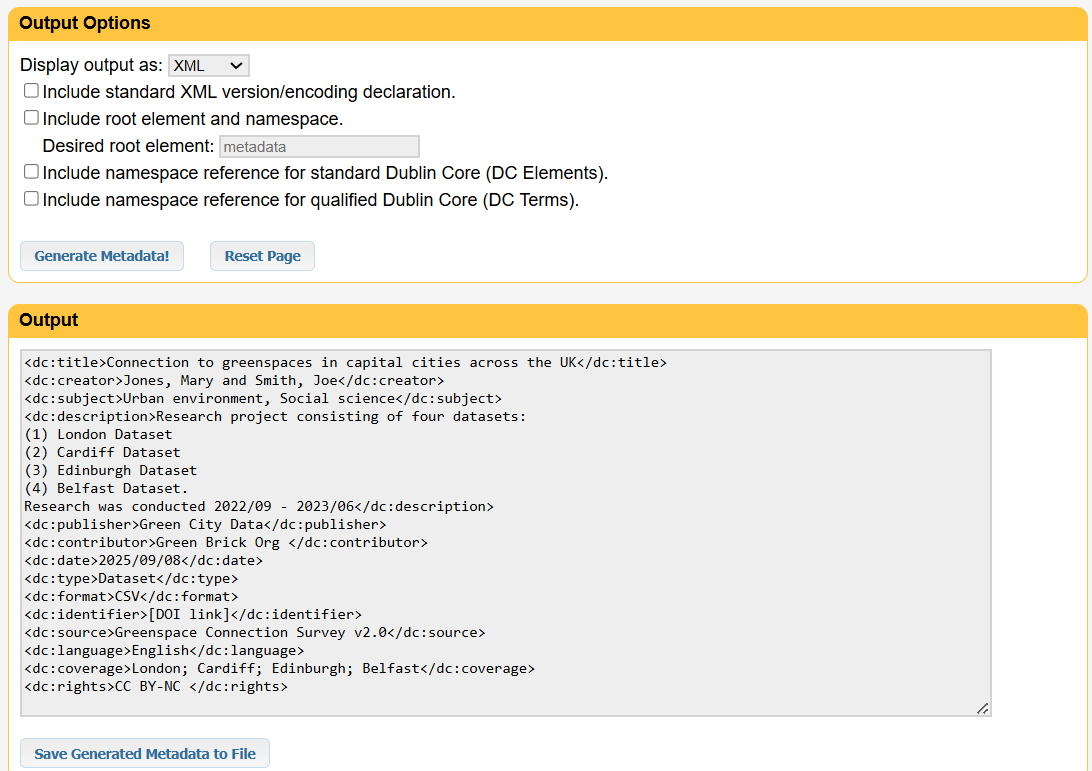
Through interpreting the information above, you could create the following metadata (or something similar)...
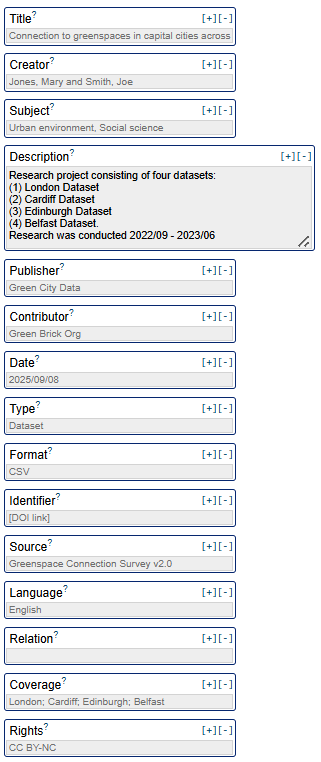
After completing the information, you can select a machine readable format such as XML, HTML, or XHTML to generate and save your metadata.
Dublin Core Advanced Metadata Generator
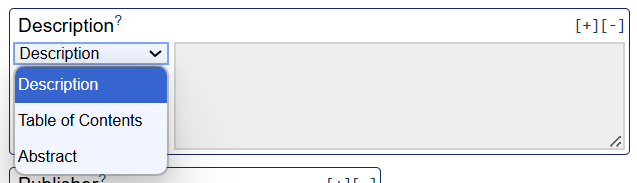
Now explore the Dublin Core Advanced Metadata Generator[4]. The Advanced Generator provides more structured support for creating metadata. For example, it allows you to refine metadata element titles (e.g. specifying different types of dates) and identify controlled vocabularies for certain fields. These features help reduce ambiguity and improve consistency. In simpler tools, some metadata elements (such as 'Date') may be open to interpretation, which can result in inconsistent or unclear metadata, unless defined by the user.
For some fields, the Advanced Generator provides a space to further specify the metadata element in order to avoid confusion...
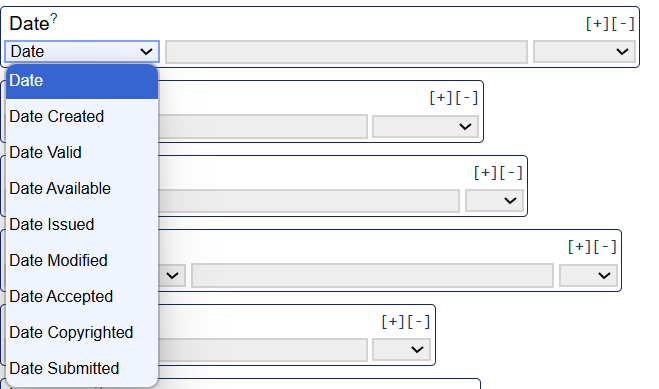
The Advanced Generator provides a list of controlled vocabularies that you could use and gives the functionality to specify which one you choose for a metadata field...
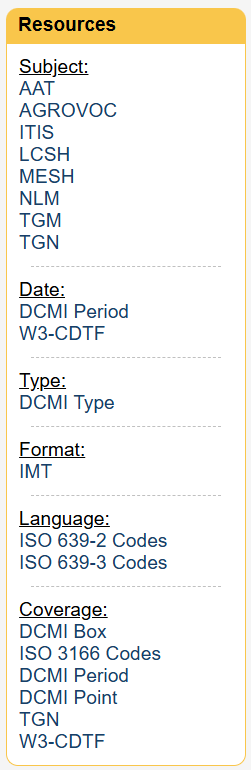
This helps you identify relevant controlled vocabularies, enabling you to make sure your metadata is consistent and interoperable (see unit 2.5 for more information about controlled vocabularies).
The Advanced Generator includes seven further metadata elements:
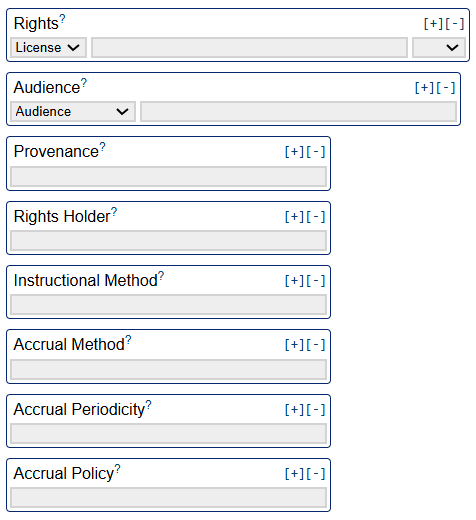
This example highlights some of the considerations when choosing a metadata tool, such as clarity of element definitions, use of controlled vocabularies, support for standardisation and interoperability as well as complexity. Simpler tools may be easier to use, but can lead to ambiguity or inconsistency. More advanced tools can improve clarity, consistency, and interoperability, but may require more setup or expertise.
There is no single tool that is suitable for every project. The Dublin Core Generators used in this unit are just examples of how metadata can be created in practice. When deciding which tool to use. Please refer back to unit 4.1 for what to consider when selecting a tool or tools.
References
- [1] DCMI (2025) 'About DCMI'
- [2] DCMI (2025) 'Simple Dublin Core'
- [3] Steffel, N. (2015) Simple Generator A JavaScript/JQuery tool for working with Dublin core metadata code.
- [4] Steffel, N. (2015) Advanced Generator A JavaScript/JQuery tool for working with Dublin core metadata code.