5.3 Activity - Create Dataset, Variable & Question Metadata
Unit overview
Unit study time
- 45 minutes
Intended Learning Outcomes
By the end of the unit, you will ...
[!NOTE] BO - Do we also want to create separate units for data collection metadata (since it's mentioned below) and questions?
In Units X and X, we explored dataset and variable metadata elements and the benefits of creating structured metadata. In this activity, you will apply this knowledge to a real example dataset.
We will use Excel to document metadata in this exercise. Excel is widely used, accessible, and familiar to many researchers. It allows you to structure metadata in a clear tabular format, apply basic validation rules, and organise information consistently without requiring specialist software. While other metadata tools exist which produce machine readable output, we will use Excel as a flexible and practical starting point for creating and managing metadata.
Excel
Excel has features that can help ensure your metadata is clean, structured and standardised. For example, you can lock cells so that metadata element titles can't be changed or you can control what data can be input into certain metadata fields using data validation tools. This helps us to implement contolled vocabularies in our metadata creation (to recap controlled vocabularies, go to unit 2.5 in the Introduction course) and reduces risk of human errors[1].
You can also download tools compatible with Excel. For example Collectica for Excel is an add-on for Excel which includes pre-defined metadata elements where you can input your metadata directly into the dataset file (rather than having a separate Excel file for your metadata).
We will practice what you've learnt using a small teaching dataset based on the 2011 Young Life and Times Survey delivered by ARK in Northern Ireland. The full dataset has been deposited on the UK Data Service and can be seen here.
Research practice example
Imagine you're a social science researcher who has collected data using the survey below.
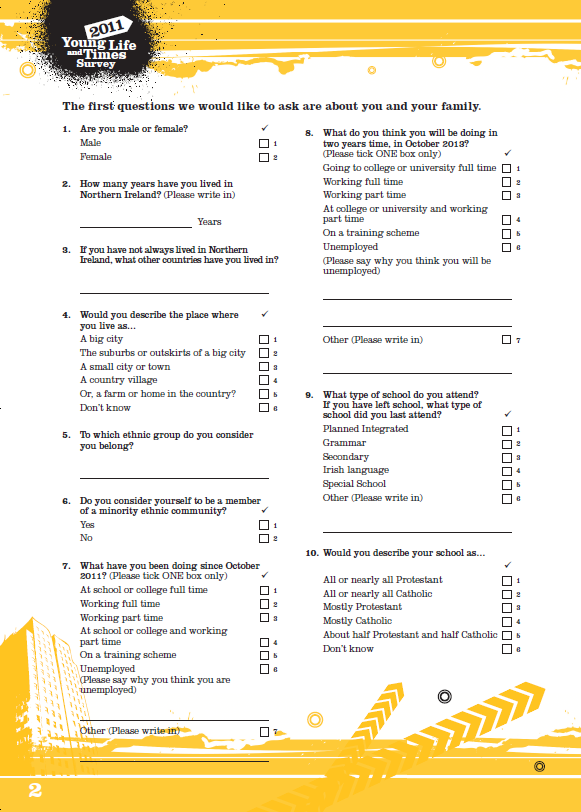
Through conducting this research you create the following dataset.
Dataset title: 7058_ylt11 teaching dataset
| respondentID | rsex | yearsni | placeliv | ethncat | memmec | thisoct | oct2yrs | typeschl | relschl |
|---|---|---|---|---|---|---|---|---|---|
| 1211 | 2 | 16 | 2 | [closed data] | [closed data] | 1 | 1 | 2 | 5 |
| 1212 | 1 | 16 | 3 | [closed data] | [closed data] | 1 | 1 | 2 | 1 |
| 1213 | 1 | 16 | 2 | [closed data] | [closed data] | 1 | 4 | 2 | 3 |
| 1214 | 1 | 16 | 5 | [closed data] | [closed data] | 1 | 1 | 3 | 2 |
| 1215 | 2 | 16 | 3 | [closed data] | [closed data] | 4 | 4 | 2 | 2 |
| 1216 | 1 | 16 | 1 | [closed data] | [closed data] | 1 | 1 | 3 | 2 |
| 1217 | 1 | 16 | 2 | [closed data] | [closed data] | 1 | 1 | 2 | 2 |
| 1218 | 2 | 16 | 3 | [closed data] | [closed data] | 1 | 4 | 2 | 1 |
| 1219 | 2 | 16 | 2 | [closed data] | [closed data] | 1 | 1 | 2 | 2 |
| 1220 | 1 | 16 | 2 | [closed data] | [closed data] | 1 | 1 | 2 | 2 |
ARK. Young Life and Times Survey, 2011 [computer file]. ARK www.ark.ac.uk/ylt [distributor], May 2012
If you want to use an alternative teaching dataset, you can find more on the UK Data Service. Expand the box below to explore more.
List of Open Access Teaching datasets from UKDS
- 2021 Census: Public Microdata Teaching Sample (England and Wales): 1% Sample: Open Access
- British Social Attitudes Survey, 2021, Health Care and Equalities: Open Access Teaching Dataset
- British Social Attitudes Survey, 2019, Poverty and Welfare: Open Access Teaching Dataset
- British Social Attitudes Survey, 2017, Environment and Politics: Open Access Teaching Dataset
- SN 7913 Opinions and Lifestyle Survey, Well-Being Module, April-May 2015: Unrestricted Access Teaching Dataset
- SN 7912 Quarterly Labour Force Survey, January - March, 2015: Unrestricted Access Teaching Dataset
You can download one of these datasets to practice metadata creation. In order to do this, you can download the dataset as a CSV or Excel file and download the user guide for the data so you have the background information about the dataset.
You want to make sure you preserve your data, documenting it clearly for your own records and share documentation where needed with colleagues and collaborators.
Using this example, create a table in Excel outlining the dataset-level metadata you would capture for this dataset.
Consider:

- What information is needed to understand the purpose and context of the dataset?
- What details would help someone else interpret and reuse the data?
- Which metadata elements from previous units are relevant here?
You can structure your table with columns such as:
- Metadata element name
- Description / definition
There is no single correct answer, but your table should demonstrate appropriate selection and use of metadata elements.
[!NOTE] Signpost to other training around metadata creation for other forms research data that is not tabular data
| Element | Metadata |
|---|---|
| Dataset title | 7058_ylt11 teaching dataset |
| Dataset description | Small teaching dataset drawn from data available in 7058_ylt11 for the purpose of metadata creation training |
| Dataset creator | Access Research Knowledge (ARK) Northern Ireland |
| Dataset contributor | - |
| Dataset date | 2011/11/16 - 2011/12/13 |
| Dataset subject | Minorities; Religion and values; Social behaviour and attitudes; Youth |
| Dataset type | Tabular |
| Dataset language | Eng |
| Identifier | - |
| Method of collection | Telephone interview; Postal survey; Online survey; (respondents could choose one method) |
| Kind of data | Survey data |
| Number of variables | 10 |
| Number of cases | 10 |
Using the metadata template
Metadata template structure
The metadata template is structured into five tabs... 1. Dataset metadata (links to unit 2.2) 2. Variable metadata (links to unit 2.3) 3. Question metadata (links to unit 2.4) 4. Codes and categories metadata (links to unit 2.5)
Each tab contains a metadata template to describe different areas of the research project. Each metadata element is linked to a definition which was covered during this course. You can also add more elements to this template if you need to capture further information. If you add metadata elements it is important to define them and specify what information should be captured.
References
- [1] Video explains the tools you can use in Excel to implement metadata best practice: https://www.uu.nl/en/research/research-data-management/guides/during-research/metadata-and-documentation